2022年10月18日 星期二

reload

 沒想到重新登入是20221018


FB似乎有對中國友好的審查機制,10.17 點讚 杜奕謹,關於習中中的文章,以及裡面的留言,就被資格審查。要上傳證件

FB似乎進化到ai 自動區分同溫層,讓同溫層的人互相容易看得見,以及rank 相對同屬性化,其他不容易找到。然而只要批評中國,或是對中國不友好,而發信ip 在臺灣,會相對"做出很多狀況"

用ai消耗臺灣人的時間,讓生產降低? 因為時間是固定的

2021年9月8日 星期三

comfst cf-wu785ac ˇ使用分享


中國製造,核心是螃蟹卡。5g的部份似乎是一根天線,所以流量多會掉ping ,造成連線不穩定。

usb 插入會自己多一個硬碟自己auto 安裝,但升級之後就無法再重新出現硬碟auto安裝


似乎是升級後的問題? 造成5g 不穩定,或是強度太強,造成5g的部份連線不穩定,而 2.4g不會有此問題。

使用usb-ac68 沒有此問題產生

2021年9月6日 星期一

smartdns 經驗分享

 1. 要找smartdns 會在後端分vpn 走各國國家


smartDNS 不錯,但後來的DNS 會 ping 不到,變成無法使用,smartdns 的ip拒絕我方ip連線。

但支援ddns . 


vpnsecure

支持DDNS  OpenVPN

支持pandora.com


但smartdns沒有設定在亞洲,而且支持的 show supported 比較少>


surfshark。dns只有一組,而且不支持abema.tv and pandora.com. 


CyberGhost 非常好的smartdns 而且支持地理位置gps  對於有檢查gps的網站會更相對於當地的地理。可以說是目前最好的,比vpn更好,vpn 通常不支持gps定位,只有流量從vpn 當地ip發出,但因為太好了,對於臺灣有些網站就不能用,尤其是設定日本,就不能看hami video.,商用的部份,銀行金融會無法使用,會認為你真的在日本。

可以說會變成完全日本使用的狀況,太好反而不能用. 


以上,主要分享smartDNS


2021年4月10日 星期六

routeros 設定


我昨天改用這命令列對icmp封鎖實測,證實本機ping的出去,但外部ping不進來.
/ip firewall filter
add action=drop chain=input dst-address-type=local protocol=icmp


再測試透過VPN Client電腦 可否ping的到本機IP..
結果不行,連VPN Client的ping全都擋掉!


遭到 11.22.33.44 的 IP 通過 syn 的 DDoS 攻擊,可以拒絕對該 IP 做連接追蹤,減少 CPU 負載 :
/ip firewall raw
add chain=prerouting src-address=11.22.33.44 action=notrack


另一種情況, 如較大的網路環境,涉及內網和外網請求,在訪問外網時需要做 nat 轉換,而內網則不需要,
因此流量和對話增加的情況下,避免 CPU 負載過高,可以透過 Raw 關閉掉訪問內網的連接追蹤。

例如,在一個大型網絡,內網IP地址段是192.168.0.0/16,關閉掉內網的連接跟蹤,配置如下:
/ip firewall raw
add chain=prerouting dst-address=192.168.0.0/16 action=notrack

配置後,在 connection-tracking 列表將不會看到內網訪問 192.168.0.0/16 的連接訊息

其他 RAW policy:
/ip firewall raw
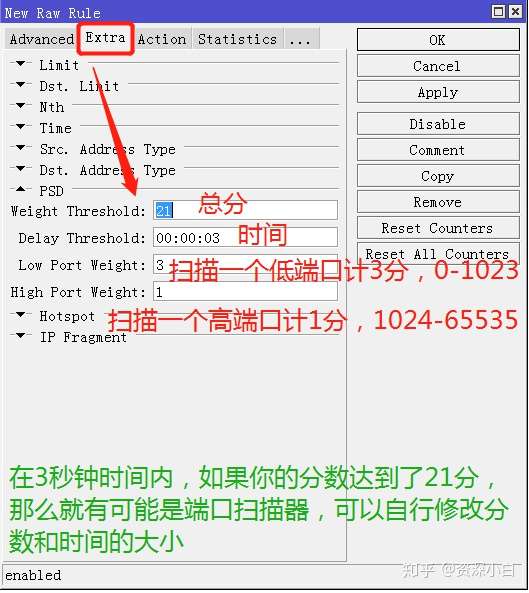
add action=drop chain=prerouting comment="Port scanners" protocol=tcp psd=21,3s,3,1
add action=drop chain=prerouting comment="Drop oversized unfragmented packets" packet-size=1492-65535 protocol=icmp
add action=drop chain=prerouting comment="SYN-FIN attack protection" protocol=tcp tcp-flags=fin,syn
add action=drop chain=prerouting comment="SYN-RST attack protection" protocol=tcp tcp-flags=syn,rst
add action=drop chain=prerouting comment="X-Mas attack protection" protocol=tcp tcp-flags=fin,psh,urg,!syn,!rst,!ack
add action=drop chain=prerouting comment="NMAP FIN attack protection" protocol=tcp tcp-flags=fin,!syn,!rst,!psh,!ack,!urg
add action=drop chain=prerouting comment="NMAP Push attack protection" protocol=tcp tcp-flags=fin,syn,rst,ack,urg,!psh
add action=drop chain=prerouting comment="NMAP FIN/PSH/URG attack protection" protocol=tcp tcp-flags=fin,psh,urg,!syn,!rst,!ack
add action=drop chain=prerouting comment="NULLflags attack protection" protocol=tcp tcp-flags=!fin,!syn,!rst,!psh,!ack,!urg
add action=drop chain=prerouting comment="ALLflags attack protection" protocol=tcp tcp-flags=fin,syn,rst,psh,ack,urg

add action=drop chain=prerouting comment="Drop udp DNS queries from WAN" dst-port=53 in-interface="WAN" protocol=udp
add action=drop chain=prerouting comment="Drop tcp DNS queries from WAN" dst-port=53 in-interface="WAN" protocol=tcp


设置Fasttrack 使来自路由器的所有DNS流量绕过队列:
1
2
/ip firewall filter add chain=forward protocol=tcp dst-port=53 action=fasttrack-connection comment="Fasttrack DNS TCP"
/ip firewall filter add chain=forward protocol=udp dst-port=53 action=fasttrack-connection comment="Fasttrack DNS UDP"


一、入侵的基本原理

想要入侵一个服务器,如果有公开的端口,像是一个网站服务器,开通了80和443端口。那么我们就可以针对性的对这个端口进行扫描和渗透,扫描是为了看看是否有其他端口,给黑客多一些选择方式,也是为收集目的网站信息的前期必备工作。渗透就是对这一类型的网站公开的漏洞进行针对性利用,或者挖掘其代码漏洞。

扫描是黑客们首先要做的事情,扫描获得的端口等信息越多,越有利于后期的攻击。

二、现阶段的网站基本信息收集

现在你认为黑客还需要扫描的话,那就落伍了。因这些东西已经被一种黑客专用的搜索引擎去替代了黑客端口扫描工作,这些这些搜索引擎使用数以万计或者几十万计的。云服务器,在全世界各地,全天候的对所有网络IP进行端口扫描。并且将这些信息归类起来。黑客们只要输入IP就可以拿到关于某个特定ip的所有漏洞信息,既而实施针对入侵。许多攻击者不再挨个扫网站漏洞,那样效率太低,当国外曝出一个高危漏洞后,他们迅速利用这类的搜索引擎找到大量存在漏洞的服务,然后在企业反应过来之前就完成渗透。

而像这种黑客专用的搜索引擎有:Shodan,zoomeye,fofa等。


抛开这种方式的好与坏,善与恶的哲学问题不谈。我们要知道如何去保护我们自己的网络才是正经事。通过对自己的IP查询,发现这些漏洞,软件层面的软件更新去解决,并在公网放置相同的模拟环境帮助我们获得自身网站对应的漏洞信息。硬件上面的我们使用ROS去阻止这种扫描器的对我们实施信息收集,黑客知道的越少,我们越安全。

三、使用使用PSD和地址列表拦截

1、处理流程

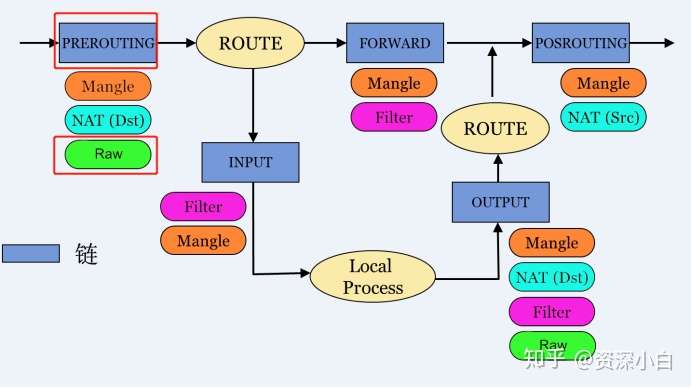
首先我们是使用防火墙进行端口扫描器拦截的,那么在四表五链里面,哪一种方式能最先接触到数据进来?那么就是RAW表的Prerouting了。具体请查看之前的第3篇-防火墙简介。
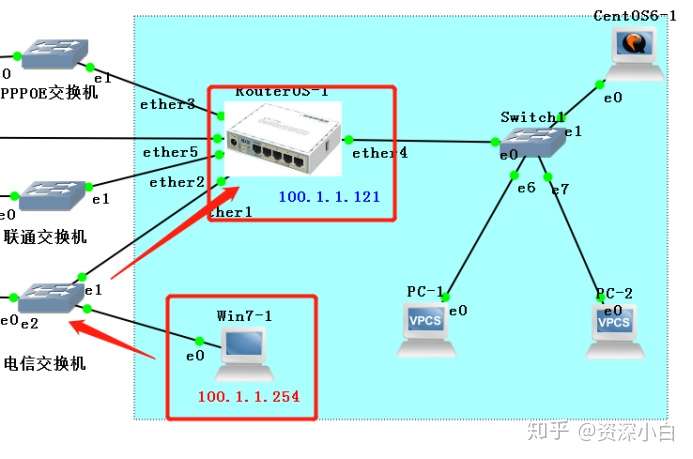
2.拓扑如下:

我们使用一台win7模拟外网的扫描器,公网IP为100.1.1.254。
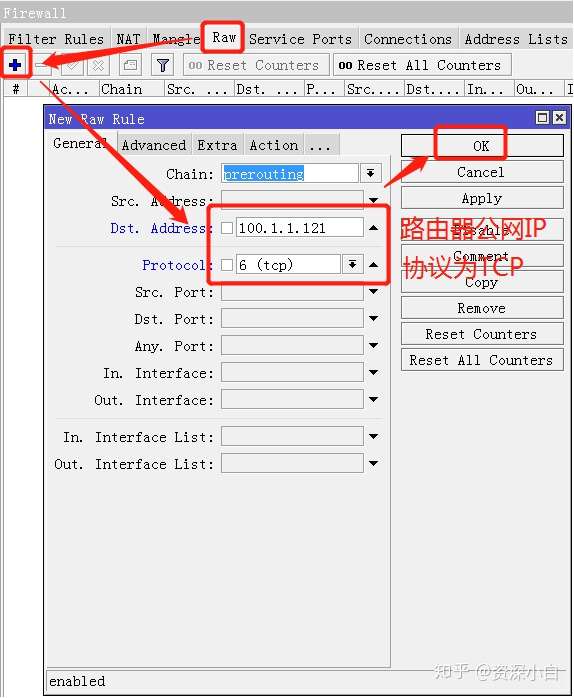
3.设置PSD

A.点击winbox的IP>Firewall>RAW,点击+号新建一个Prerouting规则

B.切换到Extra选项卡,点击PSD
C.配置动作Action,将源地址加入到地址列表:
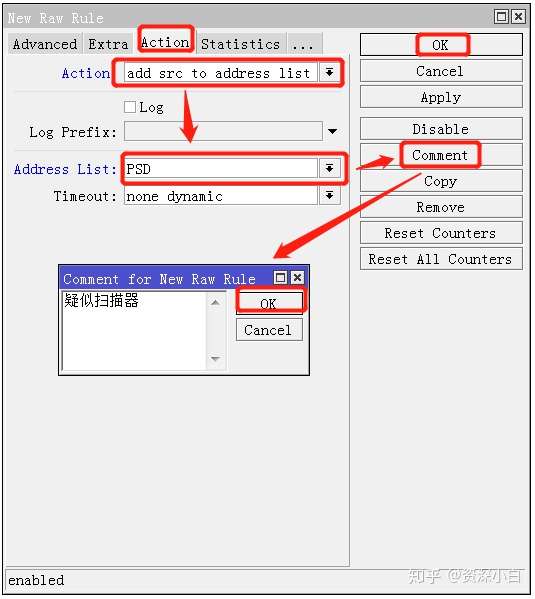
D.调用地址列表去拦截:

点击+号,新建一条规则,然后切换到Advance选项卡
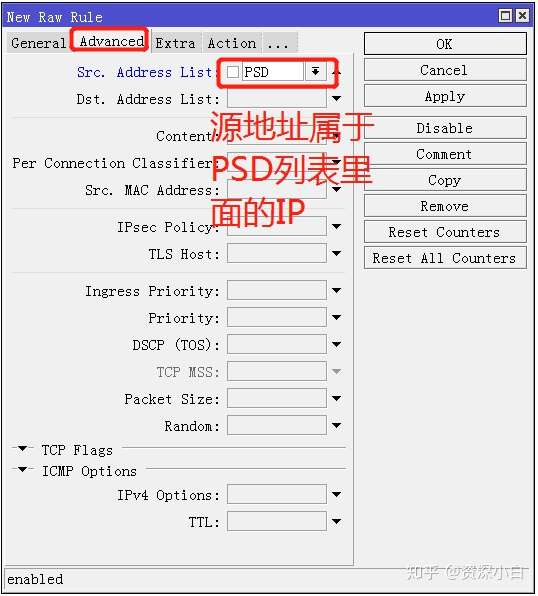
切换到Action选项卡,选择Drop丢弃
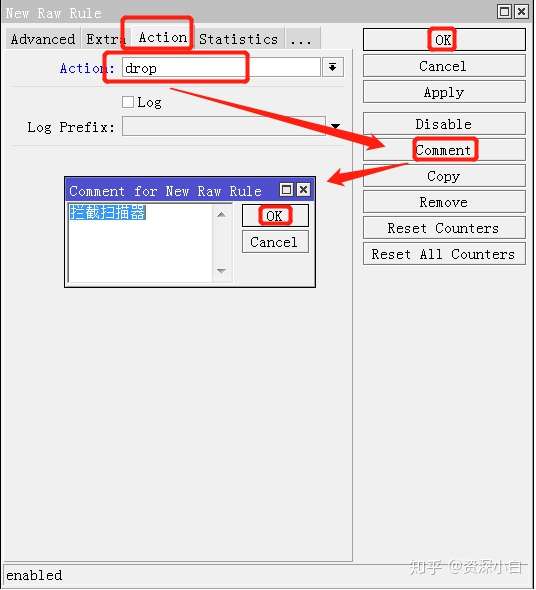
然后将拦截扫描器规则拖到疑似扫描器规则上方,最终配置如图:

2021年4月7日 星期三

adguard home 上游 DNS

 tls://dns-unfiltered.adguard.com

tls://dns.adguard.com

tls://adult-filter-dns.cleanbrowsing.org

tls://dns.east.comss.one

https://private.canadianshield.cira.ca/dns-query

https://doh-jp.blahdns.com/dns-query

tls://jp.tiar.app

tls://dns.oszx.co

tls://dot.tiar.app

tls://185.222.222.222

2021年3月23日 星期二

routeros

防止別人掃描你的routeros

/ip firewall filter add chain=input protocol=tcp psd=21,3s,3,1  action=add-src-to-address-list address-list="port scanners"  address-list-timeout=14d comment="Port scanners to list " disabled=no

/ip firewall filter add chain=input protocol=tcp  tcp-flags=fin,!syn,!rst,!psh,!ack,!urg action=add-src-to-address-list  address-list="port scanners" address-list-timeout=14d comment="NMAP FIN  Stealth scan"

/ip firewall filter add chain=input protocol=tcp tcp-flags=fin,syn  action=add-src-to-address-list address-list="port scanners"  address-list-timeout=14d comment="SYN/FIN scan"

/ip firewall filter add chain=input protocol=tcp tcp-flags=syn,rst  action=add-src-to-address-list address-list="port scanners"  address-list-timeout=14d comment="SYN/RST scan"

/ip firewall filter add chain=input protocol=tcp  tcp-flags=fin,psh,urg,!syn,!rst,!ack action=add-src-to-address-list  address-list="port scanners" address-list-timeout=14d  comment="FIN/PSH/URG scan"

/ip firewall filter add chain=input protocol=tcp  tcp-flags=fin,syn,rst,psh,ack,urg action=add-src-to-address-list  address-list="port scanners" address-list-timeout=14d comment="ALL/ALL  scan"

/ip firewall filter add chain=input protocol=tcp  tcp-flags=!fin,!syn,!rst,!psh,!ack,!urg action=add-src-to-address-list  address-list="port scanners" address-list-timeout=14d comment="NMAP NULL  scan"

/ip firewall filter add chain=input src-address-list="port scanners" action=drop comment="dropping port scanners" disabled=no


==========================


MikroTik RouterOS RAW 設定

RouterOS 從 6.36 版後多了一個 RAW 功能,上網收集資料了解了解,順便整理起來。

(上圖是依網友的流程圖模仿重畫的)

firewall Raw 列表允許選擇性在 connection tracking 之前繞過或者丟棄封包,這樣能大大的降低 CPU 負載。
該功能非常有助於防御 DOS 攻擊,RAW 列表不能匹配連接狀態的追蹤,例如 connection-state 和 L7 協議。

Raw Policy 出現在 Prerouting chin 和 output chin,並在 connection-tracking 前執行。

Raw 目的是對指定的 IP 訪問可以不經過連接追蹤(connection-tracking),有助於減少 CPU 負載 ,
但對於私有網路做 NAT 轉換,connection-tracking 是必須的,Raw 又如何在實際網路應用中發揮作用。
例如遭到 DDoS 攻擊,可以通過 Raw 規則關閉掉攻擊來源 IP 的連接追蹤,不建立本地連接會話,不予回應,降低 CPU 負載 。

在 Raw 中有兩個連表,分別是 prerouting 和 output:
prerouting 用於處理任何進入路由器的封包
output 用於處理封包來自於路由器,並通過其中一個接口離開,即由路由器自身發出的封包

例如:
遭到 11.22.33.44 的 IP 通過 syn 的 DDoS 攻擊,可以拒絕對該 IP 做連接追蹤,減少 CPU 負載 :
/ip firewall raw
add chain=prerouting src-address=11.22.33.44 action=notrack


另一種情況, 如較大的網路環境,涉及內網和外網請求,在訪問外網時需要做 nat 轉換,而內網則不需要,
因此流量和對話增加的情況下,避免 CPU 負載過高,可以透過 Raw 關閉掉訪問內網的連接追蹤。

例如,在一個大型網絡,內網IP地址段是192.168.0.0/16,關閉掉內網的連接跟蹤,配置如下:
/ip firewall raw
add chain=prerouting dst-address=192.168.0.0/16 action=notrack

配置後,在 connection-tracking 列表將不會看到內網訪問 192.168.0.0/16 的連接訊息

其他 RAW policy:
/ip firewall raw
add action=drop chain=prerouting comment="Port scanners" protocol=tcp psd=21,3s,3,1
add action=drop chain=prerouting comment="Drop oversized unfragmented packets" packet-size=1492-65535 protocol=icmp
add action=drop chain=prerouting comment="SYN-FIN attack protection" protocol=tcp tcp-flags=fin,syn
add action=drop chain=prerouting comment="SYN-RST attack protection" protocol=tcp tcp-flags=syn,rst
add action=drop chain=prerouting comment="X-Mas attack protection" protocol=tcp tcp-flags=fin,psh,urg,!syn,!rst,!ack
add action=drop chain=prerouting comment="NMAP FIN attack protection" protocol=tcp tcp-flags=fin,!syn,!rst,!psh,!ack,!urg
add action=drop chain=prerouting comment="NMAP Push attack protection" protocol=tcp tcp-flags=fin,syn,rst,ack,urg,!psh
add action=drop chain=prerouting comment="NMAP FIN/PSH/URG attack protection" protocol=tcp tcp-flags=fin,psh,urg,!syn,!rst,!ack
add action=drop chain=prerouting comment="NULLflags attack protection" protocol=tcp tcp-flags=!fin,!syn,!rst,!psh,!ack,!urg
add action=drop chain=prerouting comment="ALLflags attack protection" protocol=tcp tcp-flags=fin,syn,rst,psh,ack,urg

add action=drop chain=prerouting comment="Drop udp DNS queries from WAN" dst-port=53 in-interface="WAN" protocol=udp
add action=drop chain=prerouting comment="Drop tcp DNS queries from WAN" dst-port=53 in-interface="WAN" protocol=tcp


資料來源:
http://www.rosjb.com/803.html
https://quchao.com/entry/basic-rules-of-raw-table-in-the-routeros-firewall/


===============
ddos 拒絕 設定
/ip firewall filter add action=drop chain=input comment="drop sniffer" in-interface=ether1 src-address-list=sniffer
/ip firewall filter add action=add-src-to-address-list address-list=sniffer address-list-timeout=30d chain=input comment="mark sniffer" dst-port=22,23,876,3306,3389,137,139,445,5001,6379,27017 in-interface=ether1 log=yes log-prefix=sniffer protocol=tcp
/ip firewall filter add action=add-src-to-address-list address-list=sniffer address-list-timeout=30d chain=input comment="mark sniffer" dst-port=22,23,876,3306,3389,137,139,445,5001,6379,27017 in-interface=ether1 log=yes log-prefix=sniffer protocol=udp
/ip firewall filter add action=add-src-to-address-list address-list=sniffer address-list-timeout=30d chain=input comment="mark sniffer" dst-port=2323,5555,80,81,37215,8000,8080,8081,8291,8443,53 in-interface=ether1 log=yes log-prefix=sniffer protocol=tcp
/ip firewall filter add action=add-src-to-address-list address-list=sniffer address-list-timeout=30d chain=input comment="mark sniffer" dst-port=2323,5555,80,81,37215,8000,8080,8081,8291,8443 in-interface=ether1 log=yes log-prefix=sniffer protocol=udp
/ip firewall filter add action=drop chain=input comment="drop sniffer" in-interface=ether1 src-address-list=sniffer

======================

2021年3月13日 星期六

adguard home use

info


https://github.com/neoFelhz/neohosts

去廣告,去全天候定位,中國專用,但也去掉法輪功相關資訊 Copyright (c), Neko Dev Team & neoHosts Team. # https://github.com/neofelhz/neohosts


adguardhome
neoHosts

https://cdn.jsdelivr.net/gh/neoFelhz/neohosts@gh-pages/full/hosts.txt


https://www.blueskyxn.com/202012/2940.html


AdGuardHomeRules-由BlueSkyXN原创的ADH广告过滤拦截规则大全


https://raw.githubusercontent.com/BlueSkyXN/AdGuardHomeRules/master/all.txt

https://cdn.000714.xyz/BlueSkyXN/AdGuardHomeRules/master/all.txt


anti-AD是目前中文区命中率最高的广告过滤列表

https://raw.githubusercontent.com/privacy-protection-tools/anti-AD/master/anti-ad-easylist.txt


https://github.com/233Bazinga/AdGuardHome